
USFans Jeans, Pants and Shorts: Compare the Cut Before Changing Size
When a pair of USFans jeans looks too wide or too long in a listing, changing the size is not always the answer. You may be looking at a different cut from the one you actually want. Separate the silhouette from the measurements before replacing a saved option.
For a useful USFans spreadsheet jeans entry, keep the model, selected colour, size and relevant chart together. Add the feature that made you choose it: a wider leg, a particular length or a pocket arrangement. That short explanation helps you decide whether a later replacement is genuinely suitable rather than simply similar in a photograph.
Start with a pair you can compare meaningfully
Choose trousers you already wear for the intended purpose and establish how you will compare them. Read the listing's measurement instructions before collecting numbers. A waist measured flat across a garment is not the same figure as a full circumference, and neither should silently stand in for a body measurement.
Compare the relevant dimensions separately. The waist concerns one part of the fit; the rise, thigh, leg opening and length answer other questions. A change that addresses one measurement may move another away from your preference. Do not reduce the whole decision to a single size label.
Use the size guide if the chart does not make the endpoints clear. Ask about a missing measurement rather than inferring it from the model's pose or assuming a chart for another product applies.
Recognise a cut change hidden inside a replacement
Consider a hypothetical example: your first candidate is a wide-leg jean, but a replacement link opens a tapered version in the same colour. Choosing a larger size does not make the replacement the same design. Recheck the shape and measurement chart before deciding whether it still solves the original need.
The same problem appears when moving between rigid-looking denim and a listing that describes stretch, or between a fixed waistband and an elasticated one. Read the actual description and measurement conditions; a product photograph alone does not establish fabric composition, stretch recovery or how it will feel after wear.
Keep the old candidate available in your spreadsheet archive if you deliberately replace it. That makes the reason for the change visible without confusing the new option with the item originally considered.
Give shorts their own comparison
For shorts, check the intended length and the relevant measurement endpoints instead of borrowing a trouser-length comparison. If a listing offers a lined and an unlined option, confirm which one is selected. Likewise, a visible drawstring or zip detail does not tell you everything about the waistband or pocket construction.
A USFans Jordan shorts search is an apparel search, even when it appears alongside Jordan footwear. Record the actual shorts model and option rather than treating the shared name as evidence that it matches a shoe listing. The shoe guide covers the separate footwear decision.
For exercise or sport, do not treat an appearance match as proof of comfort or performance. The practical question is whether the product information supports your intended use, not whether another shopper styled it with similar shoes.
Check the received option before revising the parcel
When photographs become available, match the visible label and overall item to the accepted order. If a measurement is needed to resolve a concern, specify the dimension and method. A close-up with no clear endpoints may not answer whether the garment matches the chart.
For visible issues, explain the location: a seam, fastening, stain or asymmetric detail. Distinguish deliberate distressing shown in the selected listing from an unexpected mark, without assuming that every difference is intentional. Use the QC photo guide to keep the conclusion within what the image shows.
Suppose you asked to change waist size after purchase. Compare the response to that request with the option received. Do not treat the request itself as approval. If the item needs clarification, leave it out of the ready-to-send decision until you understand the result.
Resolve alterations and returns before removing material
Do not cut tags, shorten hems or request changes to the item while deciding whether to return it. Check the conditions attached to the affected order first. A preference for a different fit is also a different explanation from an item that disagrees with the accepted selection; describe the reason accurately.
The returns guide separates the request, seller response and eventual outcome. If you are keeping the item, the haul guide helps connect that decision to the final parcel rather than an earlier basket containing another size or model.
Browse a candidate against your actual requirement
Browse pants and shorts on USFans to compare the category before opening an individual candidate.
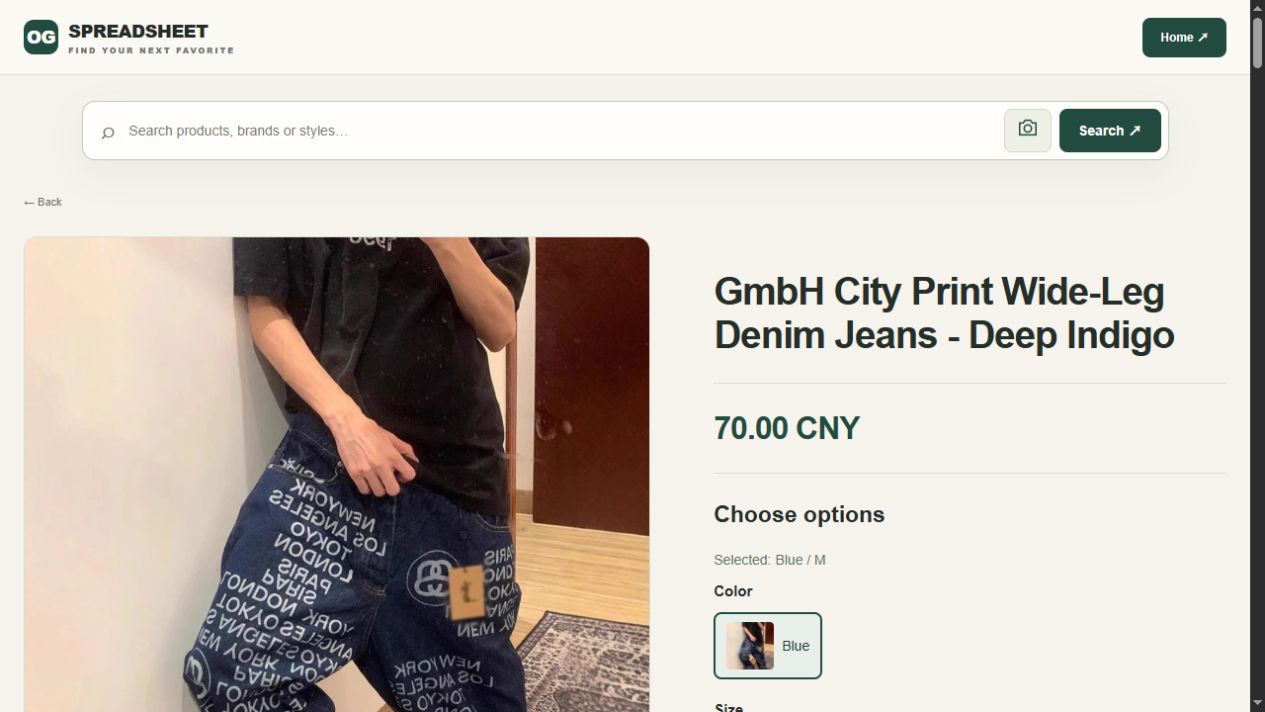
Inspect an indigo wide-leg jeans candidate on USFans when that silhouette fits your shortlist. Recheck the current option and dimensions before deciding. This is a candidate for comparison, not a pair personally worn or measured for this article.
Avoid collecting several near-identical links without a reason for choosing between them. A useful entry should make clear what would change your decision: a better-supported measurement, the right cut or confirmation of the selected option. The best spreadsheet guide explains how to compare entries on that basis.
Frequently asked questions
Can I fix a cut I do not like by ordering another size?
Not reliably. Review the design and chart first. Changing size is not equivalent to selecting a different silhouette.
Does a photographed waist label prove the measurements?
It helps identify the selected size, but a label is not a measurement of the garment. Ask for the relevant measurement if that is the unresolved question.
Should my jeans and shorts entries share one chart?
Only use a chart where it actually applies to the selected product. Do not copy dimensions between different listings to fill missing details.