
USFans Payment: Match the Amount to the Operation You Intended
Before authorizing a USFans payment, establish what the amount is for. Paying for a product, arranging a parcel and asking about an earlier transaction are different operations. A total copied from an earlier screen can become misleading if the selected items or service have changed.
Check the selected operation, amount and method together before proceeding. For an unclear result after an attempt, use the payment-failed guide before trying again.
Separate goods and parcel payments
USFans' shopping-agent guidance checked on 30 September 2026 separates the initial goods and China domestic freight payment from the later international parcel transport payment. Confirm the scope displayed for your operation rather than treating the earlier product amount as the entire delivered cost.
Keep the product choices with the purchase request and the contents, destination and selected service with the parcel proposal. The purchase guide explains those transitions; the shipping guide helps compare the later proposal.
Review the final selection before the amount
If you changed size, quantity or purchase unit, check that the request reflects the intended change. A matching product name does not settle the exact option. Do not assume a discount calculation made for an earlier basket still describes the revised one.
| Check | Question to answer |
|---|---|
| Account context | Am I using the intended account through my established access path? |
| Operation | Is this for goods, transport or another clearly stated action? |
| Selection | Do the option and quantity match what I intend? |
| Amount and currency | What is being displayed and what does it include? |
| Method | Is the method actually offered for this operation? |
| Result | What record will show what happened? |
If a field is unclear, resolve it before proceeding. A familiar logo or an urgent message does not replace that check. Use the safety guide for unexpected requests.
Payment-method names are not availability guarantees
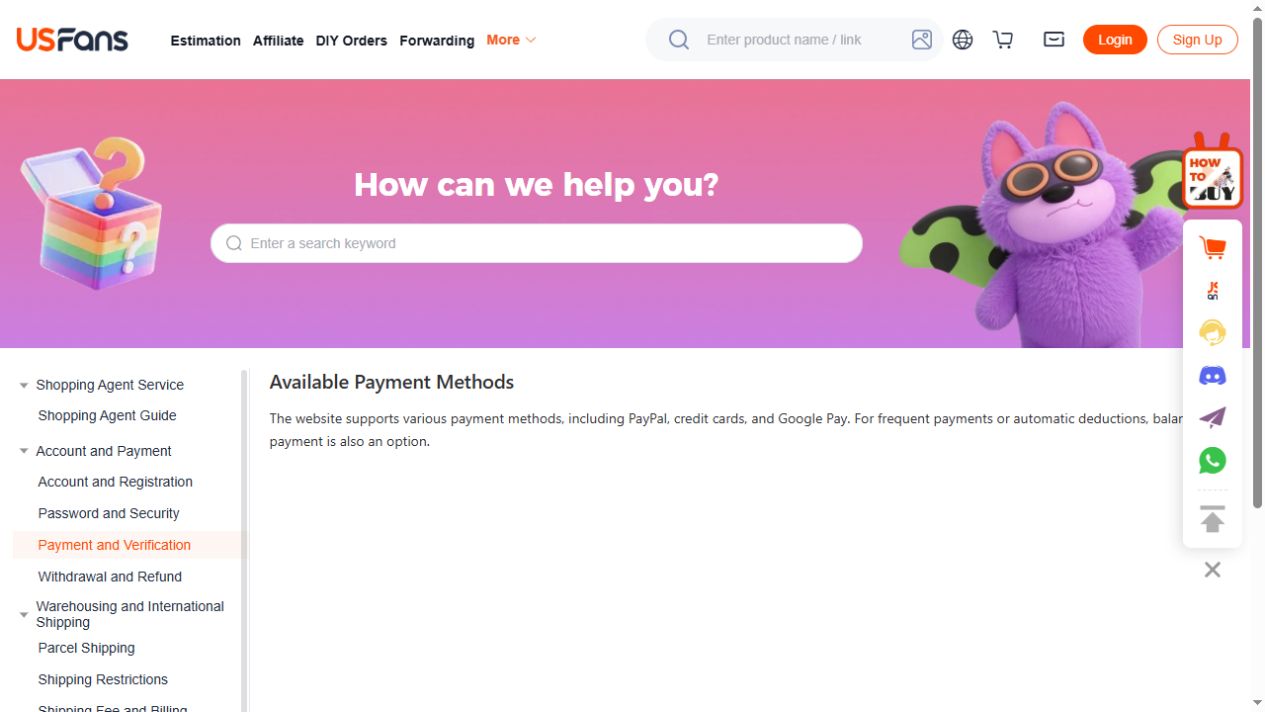
The USFans payment-method page checked on 30 September 2026 listed PayPal, credit cards, Google Pay and account balance. Use that list to understand the platform's stated options, then check which methods the current checkout offers for your particular operation.
Klarna was not on that observed list. A search for “USFans Klarna” does not establish checkout availability, but its absence from one help-page list does not prove it is unavailable in every circumstance. Do not plan a purchase around a method until it is actually offered to you.
Likewise, do not infer a fee, currency-conversion result or protection arrangement merely from a provider's name. Read the information shown for the transaction you are considering. Where an amount differs between screens, compare currency, operation and included charges before deciding why.
Keep the offer result separate from the purchase change
Imagine a hypothetical basket where you add an item after seeing a promotion. The new amount reflects a different selection, not necessarily only a coupon effect. Compare the same basket before and after a reduction if you want to understand that reduction.
The coupon guide distinguishes advertised, claimed and applied benefits. A message saying a benefit is available does not by itself show that the payable amount includes it.
Inspect the garment options on USFans as a separate shopping choice and check its selected option before comparing costs. That browsing button does not initiate a USFans payment or demonstrate any price or offer in the hypothetical comparison.
A payment record and an order record answer different questions
Read the exact state and context shown by the relevant service. Do not silently translate an unfamiliar message into “completed” or “failed.” Check which operation and amount the record concerns, and keep it distinct from later purchasing or warehouse progress.
A displayed transaction does not establish that an item arrived. A missing order view does not establish that a payment attempt had no effect. The order-status guide helps separate those records.
If the page freezes or the result remains ambiguous, do not repeat the operation merely to see a different screen. First compare the relevant records through your established access path and ask about the specific attempt if necessary.
Preserve enough context for a private question
Keep the date, amount, currency, operation and relevant transaction reference privately. Note the exact wording and whether the time zone is shown. You do not need to publish a full payment screen to explain that two records appear inconsistent.
In a trusted support channel, identify the affected attempt and ask which result is confirmed. Remove unrelated personal or financial details from attachments. Never share passwords, login codes or full card credentials with someone offering to fix the issue.
Name the transaction and the specific result you need clarified. A response acknowledging it is not the same as confirmation that a charge, cancellation or refund completed.
Keep a refund discussion attached to the original operation
If you ask about a remedy, identify the transaction concerned rather than treating all account activity as one balance change. Preserve the request, any confirmation and the outcome visible in the relevant record.
Check the refund stage and timing stated for the actual operation, then follow up on the unresolved step. A credit in a platform account and a withdrawal to a payment provider are different outcomes. The returns guide separates requesting a remedy from receiving its result.
Preserve the exact message
Keep the wording, time and stage where the interruption appeared. Did it occur before authorization, after you submitted an action or while returning to the order page? Describe what you observed rather than replacing it with a guessed cause.
Save relevant records privately. Remove full card information, account details, addresses and identifying references before sharing any public image. Do not send login codes or credentials to someone promising to fix the result.
An illustrative mismatch between screens
Imagine a hypothetical parcel payment after a packing change. The page stops loading, and the order view you reopen still shows the earlier proposal. That does not prove the new attempt failed, and the earlier proposal does not establish its result.
Keep the revised amount, attempt time and relevant records together. Ask which operation was recorded before making a new payment. Do not replace the basket or change the service simply to obtain a different-looking screen.
If only a public article fails to load, check its address and try reloading it. If money or a new purchase was involved, resolving that transaction takes priority over a display test.
Frequently asked questions
Does the first product payment cover international delivery?
Do not assume that. Check its stated scope and the separate parcel proposal applicable to your purchase.
Can I pay with PayPal or Klarna?
PayPal appeared in the platform's payment-method list checked on 30 September 2026; Klarna did not. Confirm the options offered in your current checkout and their conditions before relying on either method.
Should I retry if the order page is blank?
First establish the result of the earlier attempt. A display problem is not proof that nothing happened.
Can an OG product link verify my payment?
No. It is a browsing destination, not access to your private USFans transaction records.